
Just sat and passed the 70-573 (TS: Microsoft SharePoint 2010, Application Development) and 70-576 (PRO: Designing and Developing Microsoft SharePoint 2010 Applications) exams today.
This means I’m now officially an MCPD for SharePoint 2010 🙂
Just sat and passed the 70-573 (TS: Microsoft SharePoint 2010, Application Development) and 70-576 (PRO: Designing and Developing Microsoft SharePoint 2010 Applications) exams today.
This means I’m now officially an MCPD for SharePoint 2010 🙂
If you’re working with an InfoPath form and are trying to display it as a web enabled form but are getting errors saying the form template failed to load, it may just be due to the manifest for the XSN not containing the relative URL base.
For the following ULS errors:
The form template failed to load. (User: …., Type: NullReferenceException, Exception Message: Object reference not set to an instance of an object.)
and
Unhandled exception when rendering form System.NullReferenceException: Object reference not set to an instance of an object. at Microsoft.Office.InfoPath.Server.SolutionLifetime.DataAdapterListDataProvider.
UrlIsSameFileOrSamePath(String absoluteFileUrl, String baseFileOrFolderUrl)….
These are due to the XSN not having the base URL defined, which can be resolved by updating the manifest.xml with the following element:
Continue reading
The reason for this post is to hopefully help other users who may have come across the error generating solution files in temporary directory error when attempting to save a site as a template.

Error generating solution files in temporary directory
I came across the above error when enabling auditing against a custom content type and subsequently tried to save the site as a template. Looking through the entries in the ULS (unified logging service) log I found the following couple of errors:
Continue reading
This post describes how you would go about creating a new SharePoint field and control the URL it maps to and have it display the ECB (Edit Control Block) menu for the selected item.
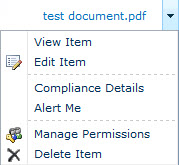
It may look like an ordinary field with an ECB but using a custom field we can control where clicking the URL takes the user.
Continue reading
The default timer schedules in SharePoint can be set too high when you’re in a development environment or are wanting to demonstrate functionality to clients. The Workflow timer has a default schedule of 15 minutes for example. Also, if you work with state machine workflows and utilise delay activities you may have scenarios where the delay between various steps is too long, especially for a customer demonstration. Even setting the value to the lowest setting of a minute can cause issues. Imagine a scenario where a sales person is showing the life cycle of a document that contains multiple steps and sub workflows. Each state change of the state machine which either performs a custom action or starts another workflow may have to wait for the Workflow timer job to run before continuing. If the demonstration involves a lot of steps and workflows there will be a lot of space to fill, which although acceptable in a live environment may not be when talking to potential clients.
Continue reading
