
Correlation value on declaration “x” is already initialized

If you’re writing a workflow and are using the CreateTask or CreateTaskWithContentType activities you may come across the following error:

System.InvalidOperationException: Correlation value on declaration “Name of your token” is already initialized

When adding a token to the create task activity you will more than likely have set the OwnerActivityName property of CorrelationToken to the workflow itself.

The create task activity (and subsequent OnTaskCreated, OnTaskChanged and CompleteTask activities) should be contained within a Sequence activity (or a child type) and it is this that should be used for the OwnerActivityName property.

Ensure that all task activities contained in your sequence block use the same correlation token definition.
Posted in SharePoint, Workflow | Tagged , | Leave a comment

Debugging SharePoint Timer Service Assemblies

If you’re creating your own workflows and want to be able to debug into your code using the timer service (OWSTIMER.EXE) deploying your assembly to the GAC won’t normally be enough for the correct symbols to be loaded. This is due to the SharePoint timer service keeping a cached version of the assemblies it uses.

To force the service to refresh the assemblies it uses you need to restart the SharePoint 2010 Timer service from the services snap-in before attaching the debugger.

Alternatively, you could add the following to the post-build event of the project you want to be able to debug:

net stop SPTimerV4
“C:\Program Files (x86)\Microsoft SDKs\Windows\v7.0A\Bin\gacutil” /i “$(TargetPath)” /f
net start SPTimerV4

This will stop the SharePoint timer service, copy the updated assembly to the GAC before restarting the service again.

Where’s the location of the gacutil program? Gacutil comes with version 1 and 1.1 of the .Net framework (not 2 or above) and Visual Studio. So it should be in at least one of these locations:

%windir%\Microsoft.NET\Framework\v1.0.3705\
%windir%\Microsoft.NET\Framework\v1.1.4322\
%programfiles%\Microsoft Visual Studio .NET 2003\SDK\v1.1\Bin\
%programfiles%\Microsoft SDKs\Windows\v6.0\Bin\
%programfiles%\Microsoft SDKs\Windows\v6.0A\Bin\
%programfiles%\Microsoft SDKs\Windows\v7.0\Bin\
%programfiles%\Microsoft SDKs\Windows\v7.0A\Bin\

For reference, here is the Gacutil MSDN page: http://msdn.microsoft.com/en-us/library/ex0ss12c(VS.80).aspx

Posted in General, SharePoint | Tagged , , , | 1 Comment

Updating URL field for ExtendedProperties in workflow

I was trying to update a URL field of a task within a custom workflow I was writing and spent a bit more time than I’d have liked trying to get the URL and description to save correctly in the task item being created as part of the CreateTaskWithContentType activity.

Obviously you can’t save a SPFieldUrlValue as an object directly against the ExtendedProperties as it is not a simple type, such as a string or an integer. Nearly every other field provided with SharePoint that contains multiple values is separated by the #; characters. The URL field is different in that it uses the comma as the separator. I knew this and set the extended property to something like:

TaskProperties.ExtendedProperties[guidIdOfField] = "http://somewebaddress,Description";

Continue reading

Posted in SharePoint, Workflow | Tagged , | 3 Comments

Delay Activity in SharePoint Workflow

Trying to use the Delay Activity workflow activity in a SharePoint workflow and having problems with it firing?

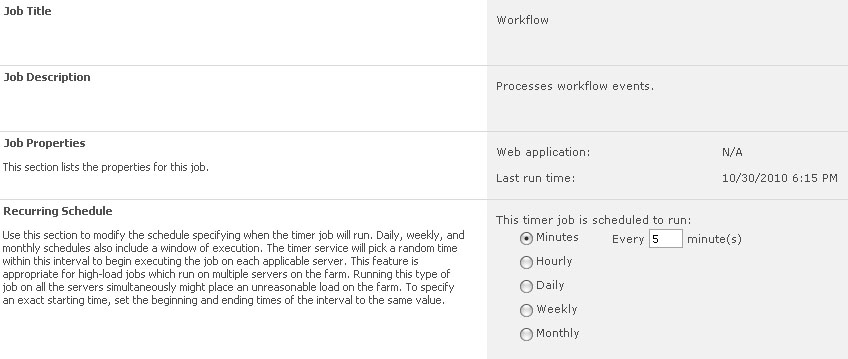
For SharePoint 2010, the delay activity will only be checked if it has completed the configured delay every time the Workflow timer job itself fires. By default this is set to run every five minutes. So, if like me you are trying to setup a delay of one minute and were trying to figure out why it wasn’t firing in time, this might help to explain why.

Workflow Timer Job Setting

Some other posts mention running the stsadm command:
Continue reading

Posted in SharePoint, Workflow | Tagged , | 1 Comment

Item does not exist. It may have been deleted by another user

A quick post to help anyone else that is using the SharePoint CreateTaskWithContentType or CreateTask workflow activity in their workflows or composite activities and get the following error in the ULS after starting the workflow via custom code:

Item does not exist. It may have been deleted by another user.” with the error code 72ew and category “Workflow Infrastructure“.

The error reported through the UI in the list or library where the workflow was running is simply Error Occurred, so not very helpful.
Continue reading

Posted in SharePoint | Tagged | 4 Comments